

THE PIPELINE
Four automated phases, one clean result.
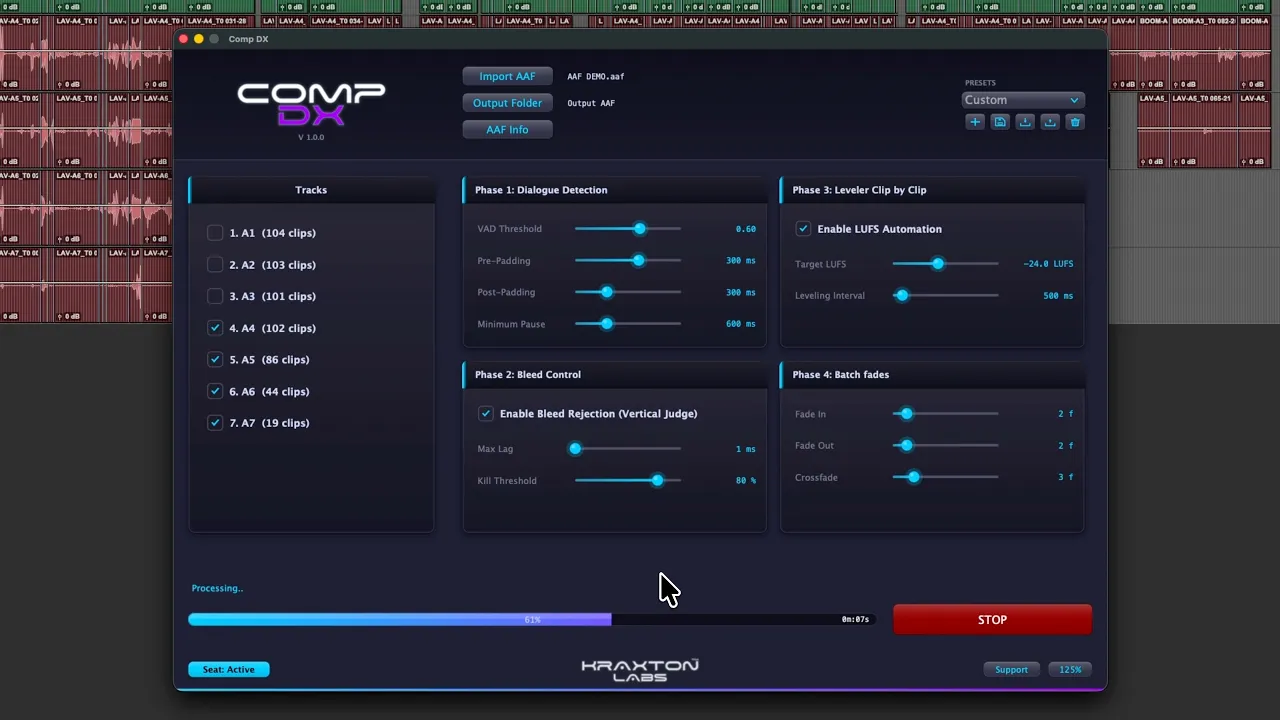
CompDX automates the first mechanical pass of dialogue editing for film and television. Load a multitrack AAF with embedded audio and it runs four phases in sequence — then delivers a brand-new AAF, ready to import into your DAW.

Phase 1
Dialogue Detection
Each selected track is analyzed by an on-device neural voice-activity model that marks exactly where human speech is present. Padding and minimum-pause controls then shape those regions into natural editorial clips.

Phase 2
Bleed Control
The Vertical Judge compares every microphone against the others over time to decide which one truly owns the voice. It measures the time difference of arrival, cuts the bleed copies and protects the mic physically closest to the speaker.

Phase 3
Leveler Clip by Clip
Surviving clips are divided into short tiles and measured for integrated loudness in LUFS. Clip gain brings each tile to your target (e.g. −24 LUFS) while guarding peaks and preserving the actor’s natural dynamic range.

Phase 4
Batch Fades
Fade-ins, fade-outs and crossfades are drawn automatically at every boundary created by the previous phases, with lengths calculated from the composition’s picture frame rate.
PROCESSING PHILOSOPHY
Automation you can trust in a professional pipeline: non-destructive, private and fully reversible.
Your original is untouched.
The input AAF is opened read-only. CompDX always writes a completely new file, so the source session is never at risk.
Nothing is rendered.
No bouncing, re-encoding or destructive normalization. Your audio files arrive in the new AAF exactly as they left the editor.
Clip gain only.
Every loudness change is written as clip gain metadata, so editors can adjust or reset any value later without losing quality.
100% local.
Audio, session data and project names never leave your computer. All analysis runs entirely on your machine.
No AI on your sound.
No denoising, de-reverb or voice synthesis. The neural model is used strictly to detect where speech is — the sound stays yours.
Ready for your DAW.
The result is a new AAF, ready to import into Pro Tools, Media Composer, Nuendo, DaVinci Resolve or Premiere Pro.
SYSTEM REQUIREMENTS
Runs natively on Mac and PC.
macOS
macOS 14 Sonoma or later
(Apple Silicon & Intel supported)
Windows
Windows 10 / 11 (64-bit)
AAF with embedded audio
AAFs must be exported with embedded audio. Files that only link to external media on disk are not supported.
Standard physical computer
For licensing security, activations are not allowed in virtual machines or on Windows 11 systems with hypervisor-backed security enabled (Core Isolation / VBS).
AS FEATURED IN

Read the official feature