

Metadata-only.
Frame-accurate matching from the AAF itself — no picture analysis, no audio fingerprinting.
Executes in your DAW.
Every copy, paste and clear is performed natively in Pro Tools® through its official scripting interface. Nothing is exported, nothing is re-imported.
Verified, not assumed.
After the conform, AAF Sync reads the session back and confirms that every clip landed where the plan said it would.
THE PIPELINE
Four steps, one conformed session.
01
Compare
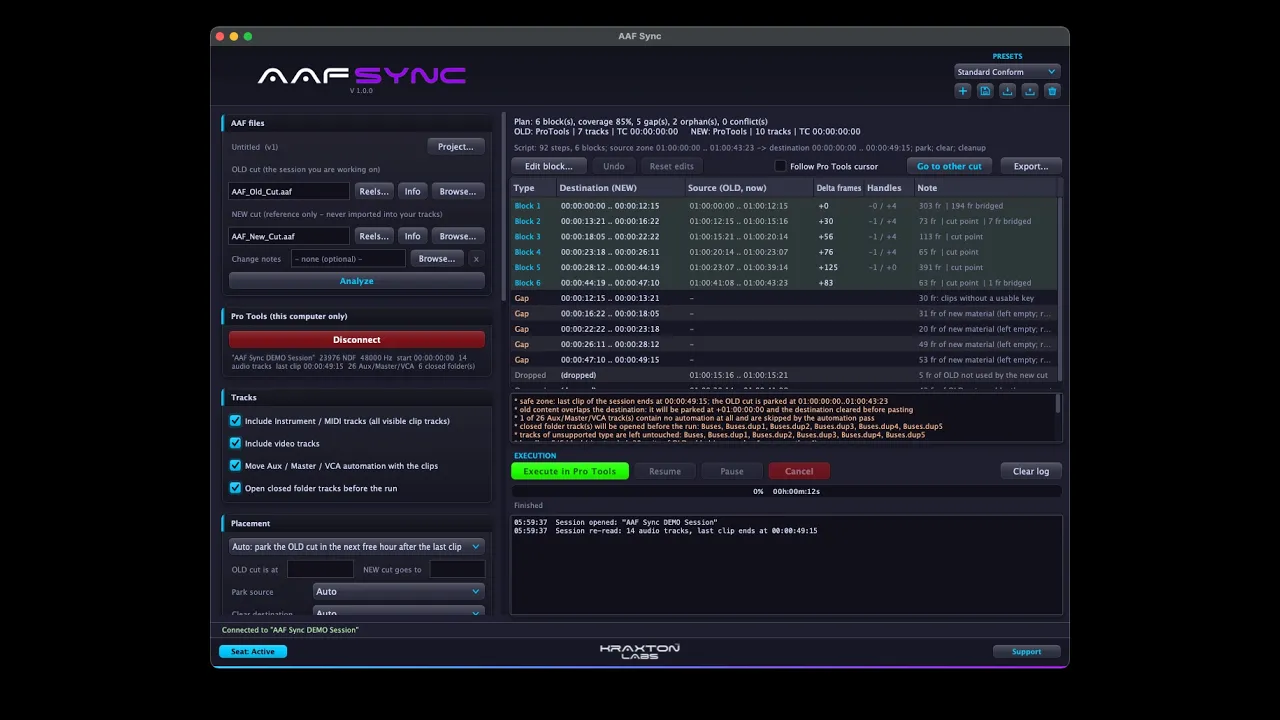
Load the old AAF and the new AAF. The engine matches every clip by name and source timecode, detects blocks that stayed together, gaps of new material, and clips that fell out of the cut — in seconds, offline, before anything touches your session.
02
Plan
Review the change list: moves, insertions, deletions and conflicts, each with old and new timecode. Set blocks aside, split or merge them, add head and tail handles, and jump your DAW to any block with one click.
03
Execute
Press once. AAF Sync parks the old cut in a safe zone, rebuilds the timeline block by block and brings the automation of every bus, aux, VCA and master along with it. Folder tracks, hidden tracks and mixed formats are handled for you.
04
Verify
The session is read back and audited clip by clip. New material from the new cut is assembled under the gaps on dedicated tracks, change markers are dropped at every edit, and the parked material is cleared only after the audit passes.
WHY IT’S DIFFERENT
Picture-free.
No reference movie, no offline video, no EDL export from the editor. If you have the two AAFs, you have everything AAF Sync needs.
Whole-session conform.
The reconform is applied to every track at once — dialogue, music, effects, buses, auxes, VCAs and the master. Volume, pan, mute, send and plug-in automation move with the audio.
Smart handles.
Extend each block by the heads and tails you choose, keep only the clips that really continue across a cut, and let automatic fades smooth every new junction.
Nothing gets lost.
Material that exists only in the new cut is imported in sync on rescue tracks beneath the session, trimmed to the gaps. Clips that fell out of the cut are listed and exported to CSV with their timecodes.
Change markers & reports.
Every join, insertion and deletion is marked on the timeline with its frame offset. Export the change list, the orphans and the new material as CSV for the editor or the supervisor.
Reversible by design.
Each run is journaled and can resume after a disconnect. The old cut stays parked until the audit passes, and your DAW’s undo history remains intact.
FOR THE ADVANCED USER
Multi-reel projects: concatenate several AAFs per side with independent start offsets.
Import Avid change notes as a complementary reference and compare them with the computed plan.
Guide-track mode: conform from a single reference track when the sequence has no usable metadata.
Timebase checks for HFR and drop-frame rates, with alerts on nested sequences that break sync.
.aafsync project files with autosave and version chaining — reopen last week’s conform and pick up from the next cut.
Automation Glide (opt-in): smooths automation at every junction without touching a single breakpoint by hand.
SYSTEM REQUIREMENTS
Runs natively on Mac and PC.
macOS
macOS 13.3 Ventura or later
(Apple Silicon & Intel, universal binary)
Windows
Windows 10 / 11 (64-bit)
AS FEATURED IN

Read the official feature
Pro Tools is a registered trademark of Avid Technology, Inc. AAF Sync is not affiliated with or endorsed by Avid.